KwikFit Invoice Generator – System Flow Overview
ViSN generates the IPP file and shares it with KwikFit. KwikFit creates the invoice JSON file from it and sends it back to ViSN. Based on this JSON file, ViSN generates the invoice and marks the enquiry as completed.
High-Level Flow
Epic References
-
VN-22024 – IPP Export Generation
https://myvisn.atlassian.net/browse/VN-22024 -
VN-23041 – IPP > Kwik Fit MOT Authorisation Request Process
https://myvisn.atlassian.net/browse/VN-23041 -
VN-22912 – IPP > Kwik Fit Automated Invoicing Process
https://myvisn.atlassian.net/browse/VN-22912
Flow Diagram

File Formats
-
Format: Text File
-
Extension:
.ath -
The file that contains authorised enquiries.
-
Format: JSON
-
Extension:
.json -
The JSON file must contain an array of objects.
-
Each object must contain an
INVOICE_HEADERproperty. -
File contains authorised enquiries.
INVOICE HEADER STRUCTURE
Field Definitions
| Column | Field Name | Type | Length | Mandatory | Description | Example |
|---|---|---|---|---|---|---|
| A | ACCOUNT_NO | Text | 100 | Yes | KwikFit account number mapped in ViSN | M5909U |
| B | INVOICE_NO | Text | 100 | Yes | Invoice number from IPP system | YE374831 |
| C | TAX_DATE | Date | 10 | Yes | Tax point date in DD/MM/YYYY format | 24/11/2025 |
| D | DEPOT_NO | Text | 100 | Yes | Supplier ID mapped to service unit in ViSN | 669 |
| E | CAR_REGISTRATION | Text | 100 | Yes | Vehicle Registration Mark (VRM) must match the enquiry VRM | SN74USH |
| F | INVOICE_VALUE | Number(9,2) | 12 | Yes | Total invoice value (Net + VAT). Format: nnnnnn.nn | 245.71 |
| G | VAT_TOTAL | Number(9,2) | 12 | Yes | Total VAT amount | 43.27 |
| H | ORDER_NO | Text | 100 | Yes | Enquiry number in ViSN (must be numeric and exist) | 57294658 |
Test Environment Details
| Environment | URL |
|---|---|
| Develop | https://visn-develop-branch.web.app/ |
Lease & Supplier User Details
| Item | Value |
|---|---|
| Company Name | Lonnie Lind Fleet Services |
| Lease User Credentials | Gavin.Davis.7759@digitalinnk.com |
| Supplier User Credentials | Lois.Will.4447@digitalinnk.com |
DI Admin Configuration Settings
| Configuration Area | Setting |
|---|---|
| Lease > KwikFit IPP Config | Add the Customer Name & Mapping ID |
| Group | IPP Kwikfit transactions export → Enabled |
Testing Procedure
Preconditions
-
Few enquiries with all job lines to Authorised status.
-
Create the JSON file based on the authorised enquiries.
-
Scheduler Links
-
kwikfit-ipp-invoice-import
-
generateIppInvoicingLogsCSV
Pre Checks
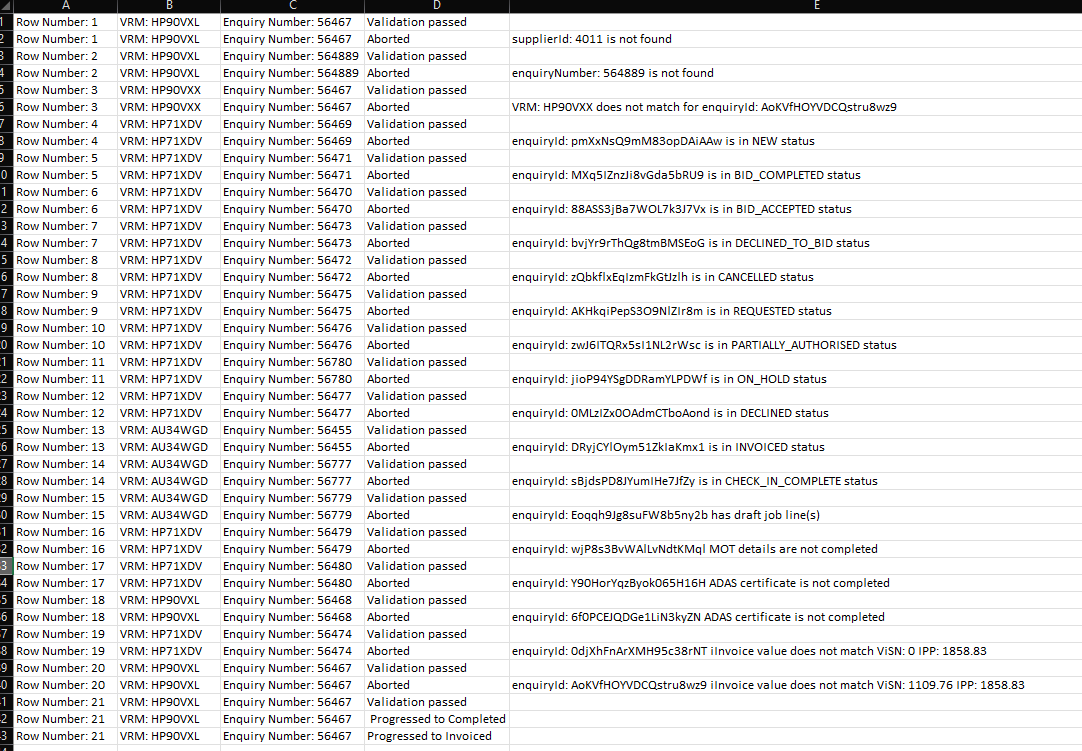
Prior to completing and generating an invoice for the enquiry in ViSN based on the IPP invoice file data, the system performs the following validations:
-
Service Unit
- Finds service unit within the provided account where
supplierId = DEPOT_NO - ❌ Abort if service unit not found
- Finds service unit within the provided account where
-
Enquiry
- Finds enquiry by matching
ORDER_NO(enquiryNumber) within the found service unit - ❌ Abort if enquiry not found
- Finds enquiry by matching
-
VRM Validation
- Verifies
CAR_REGISTRATIONmatches the enquiry VRM - ❌ Abort if VRM mismatch
- Verifies
-
Enquiry Status Check
- Verifies enquiry is in Authorised status
- ❌ Abort if enquiry is in an invalid status
-
MOT Details Check
- If enquiry contains MOT job line, verifies MOT details are completed
- ❌ Abort if MOT details are missing
-
ADAS Certificate Check
- If enquiry contains ADAS calibration, verifies ADAS certificate is saved
- ❌ Abort if ADAS certificate is missing
-
Invoice Total Matching
- Compares
INVOICE_VALUEwith ViSN calculated grand total - ❌ Abort if totals do not match (logs both ViSN and IPP totals)
- Compares
-
Draft Job Lines Validation
- Checks for draft job lines on the enquiry
- ❌ Abort if any draft job lines exist for authorised enquiries
Sample Invoice JSON File
[
  {
    "INVOICE_HEADER": {
      "COMPANY_NO": 1,
      "INVOICE_NO": "InvoiceNo-5235",
      "ADVICE_NO": -1001,
      "TRANSACTION_DATE": "32/13/2025",
      "TAX_DATE": "09/01/2026",
      "ACCOUNT_NO": "Map01",
      "ACCOUNT_NAME": "Test Fleet Ltd",
      "DEPOT_NO": "401",
      "ORDER_NO": "5235",
      "CAR_REGISTRATION": "AU49CHM",
      "CAR_MILEAGE": -500,
      "INVOICE_VALUE": 1327.18,
      "VAT_TOTAL": 217.42
    },
    "LINE_ITEMS": [
      {
        "PART_NO": "",
        "QTY_SOLD": -1,
        "UNIT_PRICE": "FREE",
        "LINE_VAT_RATE": 25,
        "LINE_VALUE": "100.00"
      }
    ]
  }
]
Execution Steps
-
Upload the Invoice JSON file to the Cloud Bucket.
Path:visn-develop-imports/Kwikfit/fileDrop -
Set the account ID in the scheduler job and trigger it.
Job:kwikfit-ipp-invoice-import -
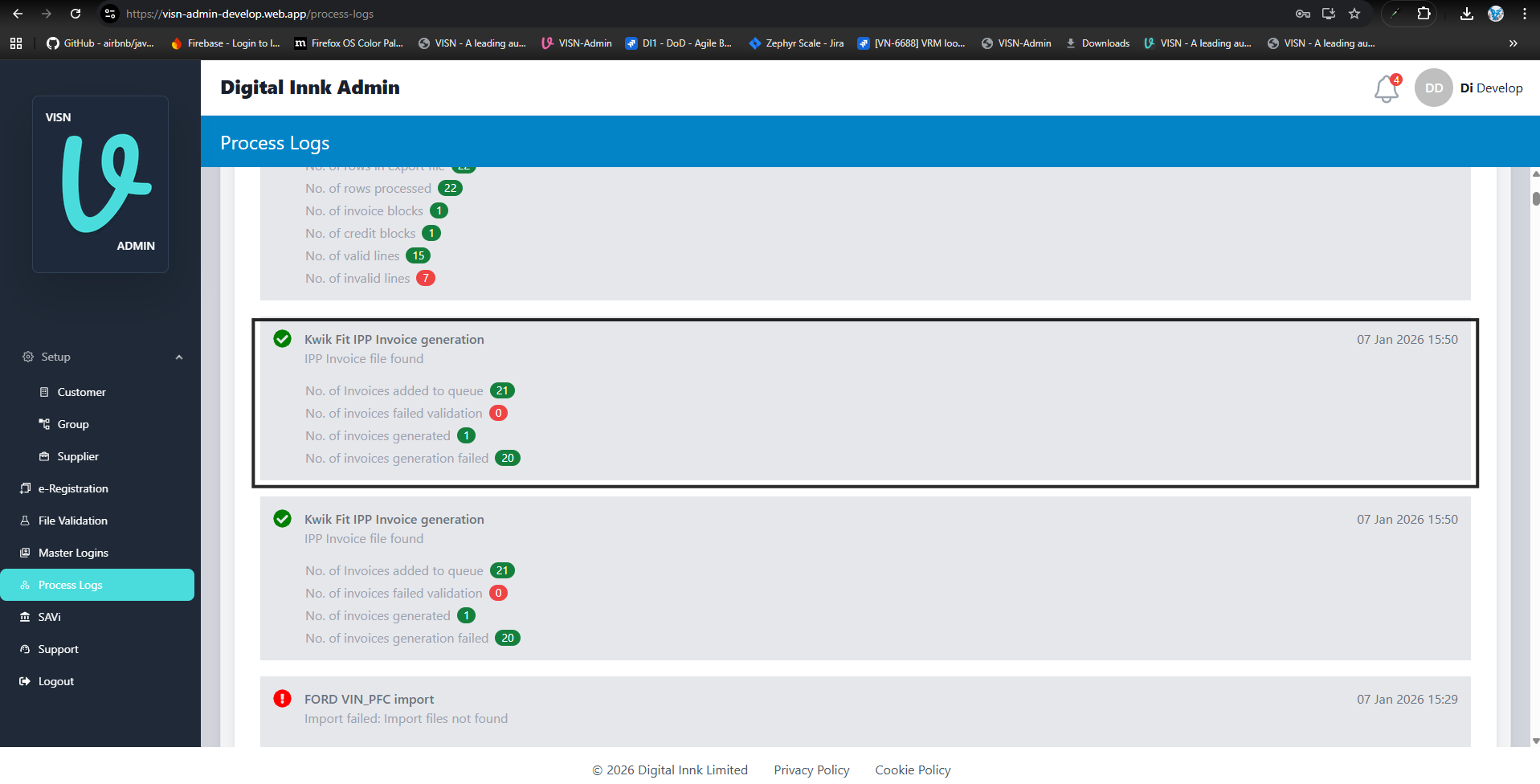
Check the Import Manager logs:
- ✅ [Validation Passed]
- Queue invoice generation task.
- Increment
invoicesAddedToQueue.
- ❌ [Validation Failed]
- Log validation error.
- Increment
invoicesFailedValidation.
- ✅ [Validation Passed]
-
Check the Queue Services:
- Find service unit in account where
supplierId = DEPOT_NO. - Find enquiry by
ORDER_NOin service unit. - Validate VRM matches.
- Validate enquiry status.
- Validate MOT details (if applicable).
- Validate ADAS certificate (if applicable).
- Validate invoice total matches.
- Find service unit in account where
-
✅ [All Preconditions Passed]
- Progress enquiry to "Completed".
- Create invoice and progress to "Invoiced".
- Log success and increment
invoicesGenerated.
-
❌ [Any Precondition Failed]
- Log specific reason for abort.
- Increment
invoicesFailedGeneration.
Log CSV Export
A scheduled function (pubsub_generateIppInvoicingLogsCSV) generates CSV exports of the import logs.
Trigger
- Pub/Sub Topic:
generateIppInvoicingLogsCSV
Default Behavior
- Exports today's logs by default.
- Can be configured to export logs for a specific date.
Output Location
exports/ippInvoicing/logs/{year}/{monthName}/{day}/{ipp_invoicing_logs_{year}-{month}-{day}.csv}
Content
- Includes all log entries from the import process.
- Excludes the end-of-log-entry document.
Process Log
- Creates a process log entry with type KWIKFIT_IPP_INVOICE.
- Contains execution statistics.
Enquiry Progression
When Preconditions are satisfied
-
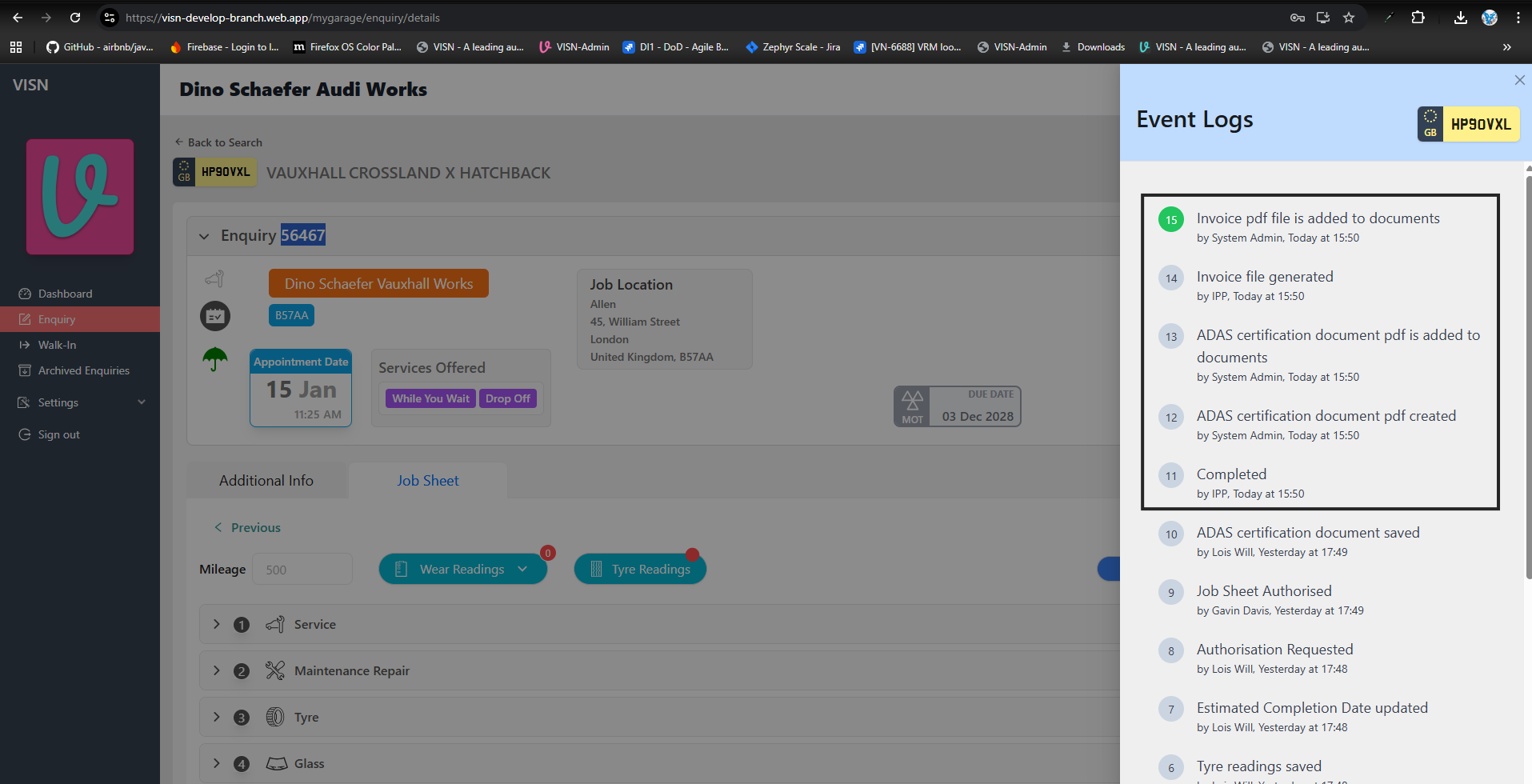
Progress to Completed:
- Updates enquiry status to "Completed"
- Adds event log entry with user "IPP"
-
Generate Invoice Data:
- Retrieves prefilled invoice data from the enquiry
- Merges IPP invoice details:
taxPointDate→ fromTAX_DATE(formatted as "dd MMM yyyy")invoiceNumber→ fromINVOICE_NOinvoiceSavedDate→ current timestampcalculatedGrandTotal→ from prefilled data
-
Save Invoice Data:
- Saves invoice data to:
accounts/{accountId}/serviceUnits/{serviceUnitId}/enquiries/{enquiryId}/invoices/invoice
- Saves invoice data to:
-
Create Invoice and Progress to Invoiced:
- Generates an invoice.
- Adds event log entries: "Enquiry Completed by IPP" and "Enquiry Invoiced by IPP".
- Progresses the enquiry status from "Completed" to "Invoiced".
- Updates the enquiry documents in both the supplier and lease company systems.
- Sets the
invoiceGeneratedflag totrue. - Saves the enquiry to the billing system.
Note: Invoice PDF generation and export record creation are automatically handled as part of the invoicing process.
Authored By: Vani.B on Jan 10, 2026