Zenith Customer Contract Import without Sub Customers Allocation
Introduction
This will import zenith vehicles in to ViSN, without creating sub customers for zenith
download sample zenith customer contract import file.
File format
Comma Separated Values - *.csv
Encoding - UTF-8
Zenith Customer Customers Import
| Zenith Customer contract fields | Description | Max length | Data Type | Rules | Mandatory | Default Values | Example |
|---|---|---|---|---|---|---|---|
| Registration | Vehicle Registration number | 10 | String | A-Z & 0-9 Characters | Y | 200LTW | |
| VIN | Vehicle identification number | 20 | String | A-Z 0-9 and Special Characters | N | SALCA2AN9MH890904 | |
| Asset Number | Asset Number | 50 | String | A-Z & 0-9, space and hyphen (-) | N | 88 AX29-UE39 | |
| Registration Date | Registration Date | NA | Number | DDMMYYYY | N | 30102024 | |
| Make | Make of the vehicle | 50 | String | A-Z 0-9 and Special Characters | N | Ford | |
| Model | Model of the vehicle | 50 | String | A-Z 0-9 and Special Characters | N | Escape | |
| Specification | Specification | 100 | String | A-Z 0-9 and Special Characters | N | Manual transmission | |
| Fuel Type | Fuel type of vehicle | 50 | String | A-Z 0-9 and Special Characters | N | Petrol | |
| Vehicle Type | Type of vehicle | NA | String | NA | Y | Valid vehicle types: Car, LCV, Van, Commercial (under 3.5), Commercial (over 3.5), HGV, Motor Bike, Electric Car | |
| Contract Start Date | Start date of contract | NA | Number | DDMMYYYY | N | 30102024 | |
| Contract End Date | End date of contract | NA | Number | DDMMYYYY | N | 30102024 | |
| Contract Mileage Term | Mileage of Vehicle | 6 | Number | 0-9 | N | 33448 | |
| CAPID | Cap Id | 20 | String | A-Z 0-9 and Special Characters | N | QW82JK764HSN | |
| Argic Code | Argic Code | 20 | String | A-Z 0-9 and Special Characters | N | 82JK764HSN | |
| Colour | Colour of Vehicle | 200 | String | A-Z 0-9 and Special Characters | N | Pearl White | |
| MOT Due date | Last date for MOT | NA | Number | DDMMYYYY | N | 30102024 | |
| Maintained | Only "Maintained" vehicles are imported, if the value is other than Y, then it is ignored and a log is added | NA | String | Y or N | N | Y | |
| Service Schedule | Service Schedule | 8 | Number | 0-9 | N | 23821828 | |
| Warranty Parameter Months | Warranty parameter months | 3 | Number | 0-9 | N | 24 | |
| Warranty Parameter Mileage | Warranty mileage | 6 | Number | 0-9 | N | 223445 | |
| Fridge | Fridge | NA | String | Y or N | N | N | N |
| Tail Lift | Tail Lift | NA | String | Y or N | N | N | N |
| Crane | Crane | NA | String | Y or N | N | N | N |
| Customer Name | Customer Name | 100 | String | A-Z 0-9 and Special Characters | N | Citroën | |
| Customer Account Number | Customer Account Number | 50 | String | A-Z 0-9 and Special Characters | N | XW442TYW | |
| VAT Number | VAT Number | 15 | String | A-Z 0-9 and Special Characters | N | GB33IW88W | |
| Address 1 | Building Number | 50 | String | A-Z 0-9 and Special Characters | N | 90-92 | |
| Address 2 | Street Name | 100 | String | A-Z 0-9 and Special Characters | N | Yarm Ln | |
| Address 3 | District | 50 | String | A-Z 0-9 and Special Characters | N | Stockton | |
| Address 4 | Town | 100 | String | A-Z 0-9 and Special Characters | N | Tees | |
| Address 5 | County | 50 | String | A-Z 0-9 and Special Characters | N | Conford | |
| Postcode | Postcode | 15 | String | A-Z 0-9 | N | TS181LA | |
| SMR | SMR | NA | String | Y or N | N | N | N |
| Tyres | Tyres | NA | String | Y or N | N | N | N |
| Glass | Glass | NA | String | Y or N | N | N | N |
| Accident Management | Accident Management | NA | String | Y or N | N | N | N |
| Breakdown | Breakdown | NA | String | Y or N | N | N | N |
| Insurance | Insurance | NA | String | Y or N | N | N | N |
| Rental | Rental | NA | String | Y or N | N | N | N |
| Cost Centre | Cost Centre | 15 | String | A-Za-z0-9_@./'#&+-/(/)' ' | N | 23-4523 | |
| Invoice Centre | Invoice Centre | 15 | String | A-Za-z0-9_@./'#&+-/(/)' ' | N | 68-0931 | |
| Customer Contact | Contact Number | 15 | Number | 0-9 | N | 828392342 | |
| Customer Number | Customer Number | 15 | Number | 0-9 | N | 828392342 | |
| Customer Email | Customer Email | 50 | String | Standard email format | N | username@email.com | |
| Customer Policy Notes | Customer Policy Notes | 250 | String | A-Z 0-9 and Special Characters | N | Advised the customer to update their payment information. | |
| Customer Recharge Limit | Customer Recharge Limit | 6 | Number | 0-9 | N | 23821828 | |
| Customer Referral Limit | Customer Referral Limit | 6 | Number | 0-9 | N | 24 | |
| Driver Firstname | Driver first name | 50 | String | A-Z 0-9 and Special Characters | N | André | |
| Driver Lastname | Driver Last name | 50 | String | A-Z 0-9 and Special Characters | N | Frédéric | |
| Driver Email | Driver Email | 50 | String | Standard email format | N | driver@email.com | |
| Driver Number | Driver Number | 11 | Number | 0-9 | N | 23821828 | |
| Policy Number | Policy Number | 25 | String | A-Z & 0-9 Space, Dash and hyphen | N | 931-292 | |
| Policy Start Date | Policy Start Date | NA | Number | DDMMYYYY | N | 30102024 | |
| Policy End Date | Policy End Date | NA | Number | DDMMYYYY | N | 30102024 | |
| Policy Term | Policy Term | 100 | String | A-Z 0-9 and Special Characters | N | The policy term is valid from 01/01/2024 to 12/31/2024 | |
| Product Type | Product Type | 20 | String | a-z A-Z 0-9 | N | WR91OJ |

Importing a file
Preparation
-
Create a new branch with Jira task number in the branch name
-
Delete all the files in importFiles folder
-
Create a folder with the current sprint number
-
Copy the file that needs to be imported
-
Go to
package.json, find the linevalidate:zenithCustomerContractWithoutSubCustomer -
Modify
--leaseIdwith the required lease Id -
Modify
--filewith the relative path of the file -
Save package.json
Validating locally
-
in a terminal run
npm run build -
in a terminal run
npm run validate:zenithCustomerContractWithoutSubCustomer -
If there are no errors, push the code
Validating in workflow
-
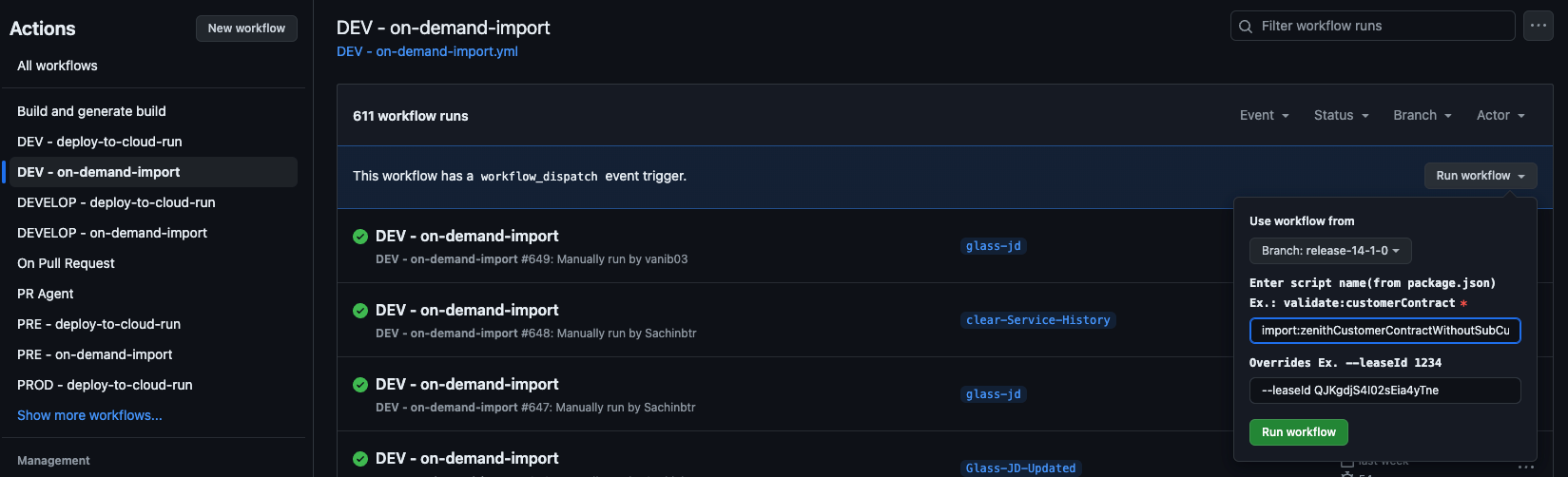
Go to Action of Import-manger
-
Find
<Environment> - on-demand-import -
Select the branch that was created for this import
-
Enter script name as
validate:zenithCustomerContractWithoutSubCustomer -
Leave Overrides empty

Importing the file
-
If the validation has passed
-
Go to Action of Import-manger
-
Find
<Environment> - on-demand-import -
Select the branch that was created for this import
-
Enter script name as
import:zenithCustomerContractWithoutSubCustomer -
Enter
--persistin Overrides field

Importing the file via cloud run
Creating Schedulers for validating the zenith customer contract
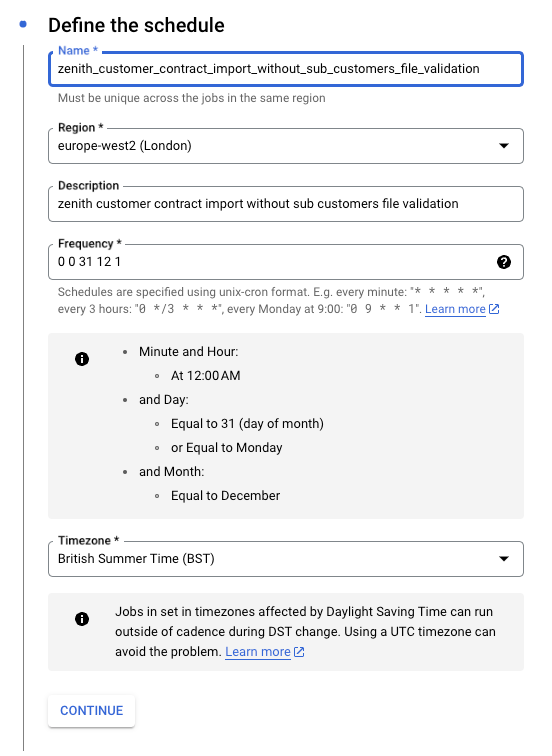
- Go to Cloud Scheduler and select the CREATE JOB
Setup Required
A Scheduler should be created cloud scheduler with the following parameters
- Name: zenith_customer_contract_import_without_sub_customers_file_validation
- Region: europe-west2
- Frequency: 0 0 31 12 1
- TimeZone: GMT London
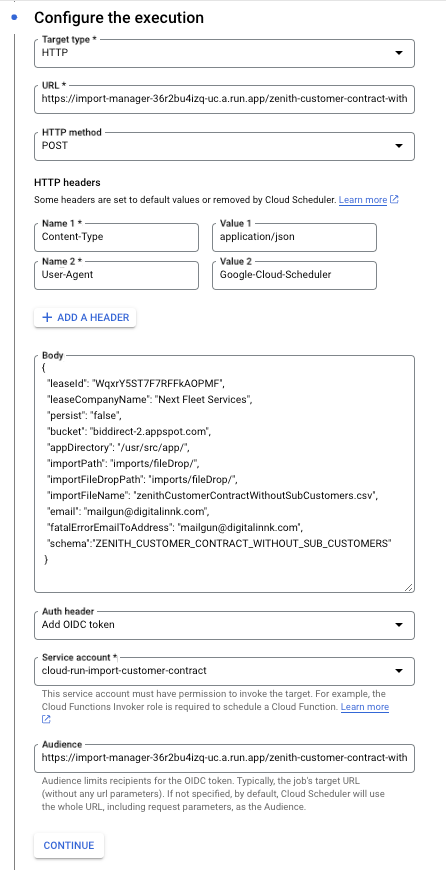
- Target type: HTTP
- URL: https://import-manager-36r2bu4izq-uc.a.run.app/zenith-customer-contract-without-sub-customers
- HTTP method: POST
- Auth header: select OIDC token
- Service account: cloud-run-import-customer-contract
- body: a JSON object including the following parameters
JSON object for zenith_customer_contract_import_without_sub_customers_file_validation scheduler
{
  "leaseId": "QJKgdjS4I02sEia4yTne",
  "leaseCompanyName": "Next Fleet Services",
  "persist": "false",
  "bucket": "biddirect-2.appspot.com",
  "appDirectory": "/usr/src/app/",
  "importPath": "imports/fileDrop/",
  "importFileDropPath": "imports/fileDrop/",
  "importFileName": "zenithCustomerContractWithoutSubCustomers.csv",
  "email": "mailgun@digitalinnk.com",
  "fatalErrorEmailToAddress": "mailgun@digitalinnk.com",
  "schema": "ZENITH_CUSTOMER_CONTRACT_WITHOUT_SUB_CUSTOMERS"
}
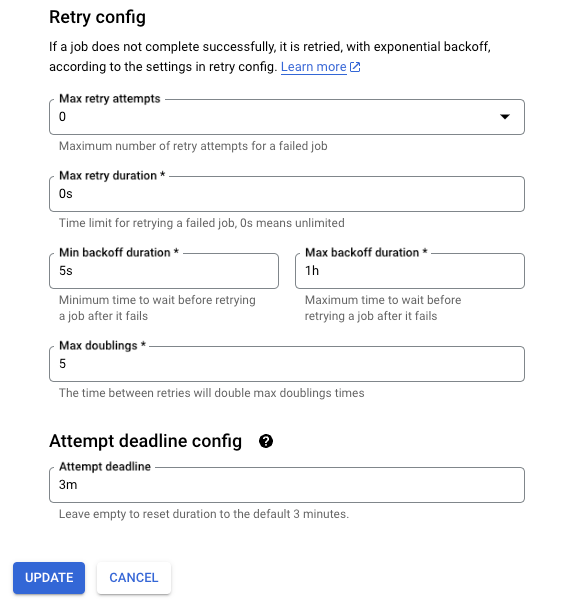
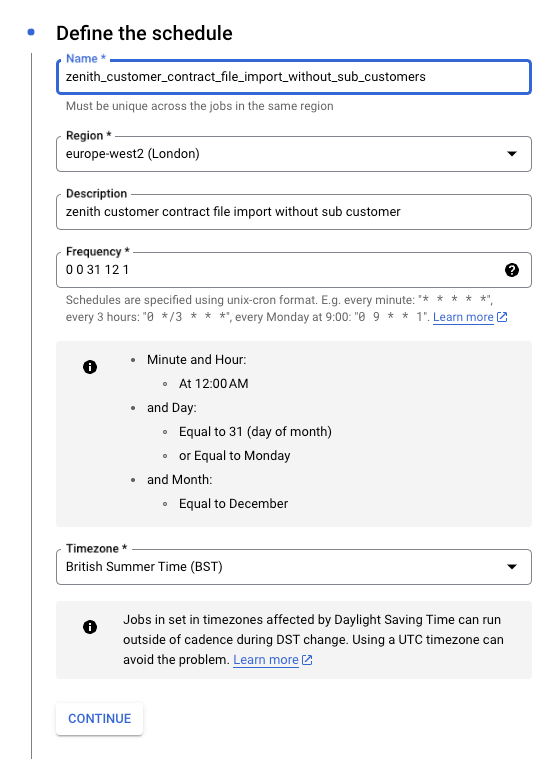
Create scheduler for validating Zenith customer contract
Creating Schedulers for importing the zenith customer contract
- Go to Cloud Scheduler and select the CREATE JOB
Setup Required
A Scheduler should be created cloud scheduler with the following parameters
- Name: zenith_customer_contract_file_import_without_sub_customers
- Region: europe-west2
- Frequency: 0 0 31 12 1
- TimeZone: GMT London
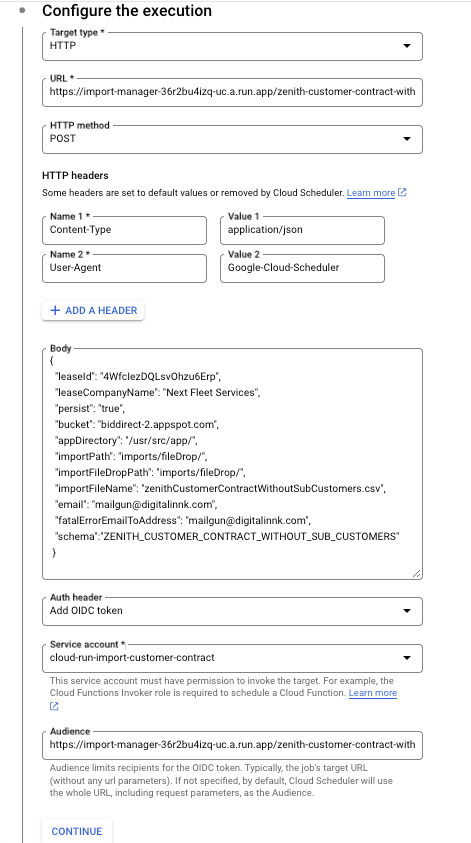
- Target type: HTTP
- URL: https://import-manager-36r2bu4izq-uc.a.run.app/zenith-customer-contract-without-sub-customers
- HTTP method: POST
- Auth header: select OIDC token
- Service account: cloud-run-import-customer-contract
- body: a JSON object including the following parameters
JSON object for zenith_sub_customer_file_import scheduler
{
  "leaseId": "QJKgdjS4I02sEia4yTne",
  "leaseCompanyName": "Next Fleet Services",
  "persist": "true",
  "bucket": "biddirect-2.appspot.com",
  "appDirectory": "/usr/src/app/",
  "importPath": "imports/fileDrop/",
  "importFileDropPath": "imports/fileDrop/",
  "importFileName": "zenithCustomerContractWithoutSubCustomers.csv",
  "email": "mailgun@digitalinnk.com",
  "fatalErrorEmailToAddress": "mailgun@digitalinnk.com",
  "schema": "ZENITH_CUSTOMER_CONTRACT_WITHOUT_SUB_CUSTOMERS"
}
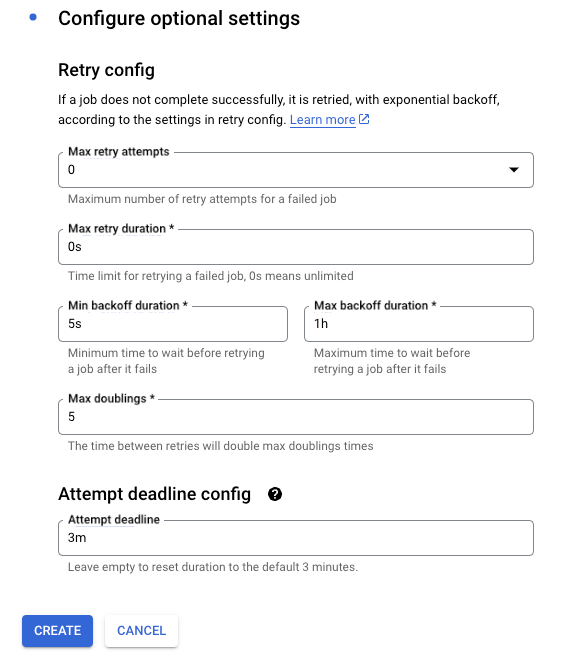
Create scheduler for importing Zenith customer contract
Preparation:
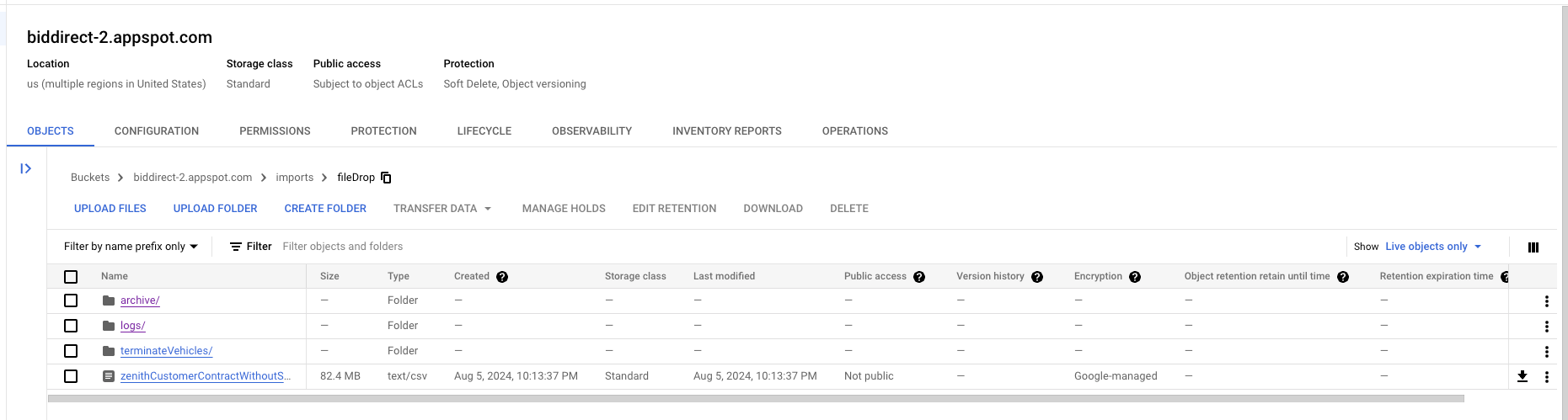
- Bucket name is biddirect-2.appspot.com and it will vary for higher envs and the file path should imports/fileDrop, where you can drop the CSV file named "zenithCustomerContractWithoutSubCustomers". This action will place the file in the specified location within the designated bucket.
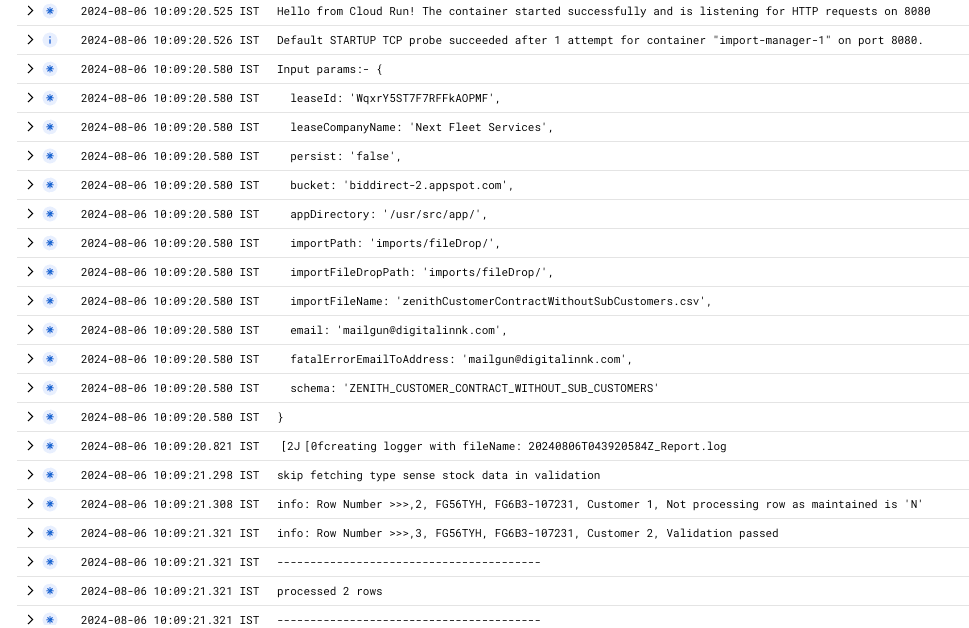
Validation:
- Go to Cloud Scheduler
- Run zenith_customer_contract_import_without_sub_customers_file_validation job (job name could be different on other env)

logs in cloud
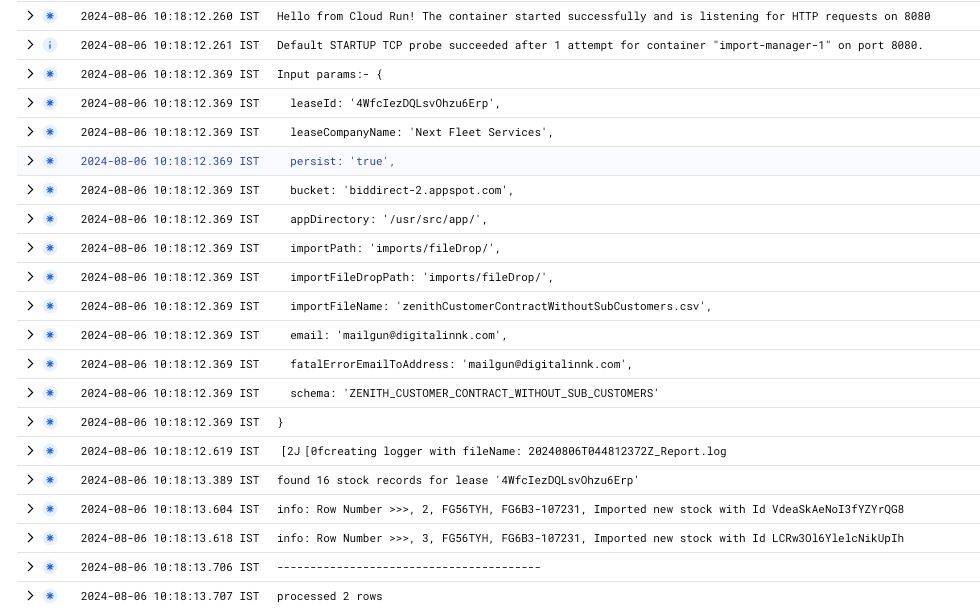
Importing:
- Go to Cloud Scheduler
- Run zenith_customer_contract_file_import_without_sub_customers job (job name could be different on other env)

logs in cloud
Testing
- Zenith vehicles will be imported, You can verify this by navigating to the ViSN customer platform and selecting
Vehicle Recordsearch for imported vehicle.
Status: Pending Approval
Category: Protected
Authored By: Hadley on August 6, 2024
Revisions